
Bhajans, aartis, kirtans and mantra chants are played every single day in Indian homes, temples and phones, not only during festivals. If you sing or produce devotional music, the question isn't whether listeners exist. It's how to release a bhajan on Spotify, JioSaavn and other apps so those listeners can actually find it. This guide walks you through it, step by step.
Quick answer: you can't upload a bhajan directly to Spotify or JioSaavn. Both take music through a label or a music distributor such as MV Distribution. You need a final recording, square cover art, correct credits and clear rights to the lyrics and tune. Deliver it at least 7 days before release day so you can pitch it on Spotify.
Before You Release: Is the Bhajan Yours to Release?
Devotional music has one question that other genres rarely face: who owns a song that people have sung for generations? Here's the simple version for India.
Old traditional lyrics
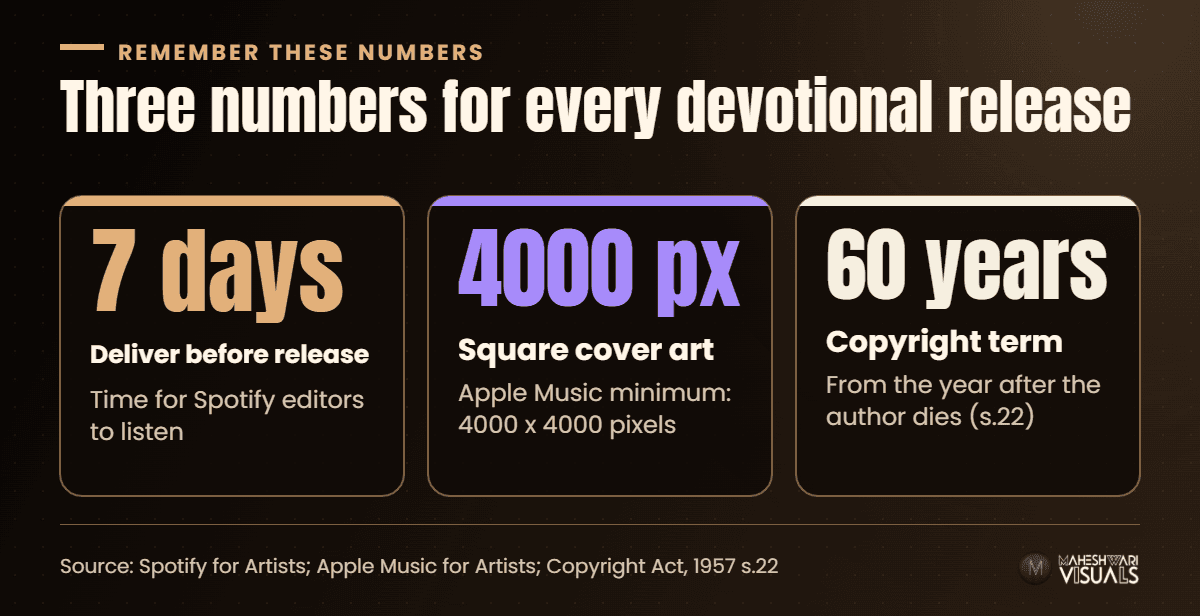
Under Section 22 of the Copyright Act, 1957, copyright in a published musical or literary work lasts for 60 years, counted from the start of the year after the author's death. So lyrics by poet-saints who lived centuries ago are free to sing. You can record them in your own tune and arrangement, and that new recording is yours.
Modern bhajans and famous versions
A bhajan written by a living lyricist or composer is still protected. So is every recording: under Section 27, a sound recording is protected for 60 years from the year after it was published. That means you can't reuse anyone else's audio, and recreating a well-known modern version, with its tune and new verses, counts as a cover. For that, read our guide to releasing a cover song legally in India first.
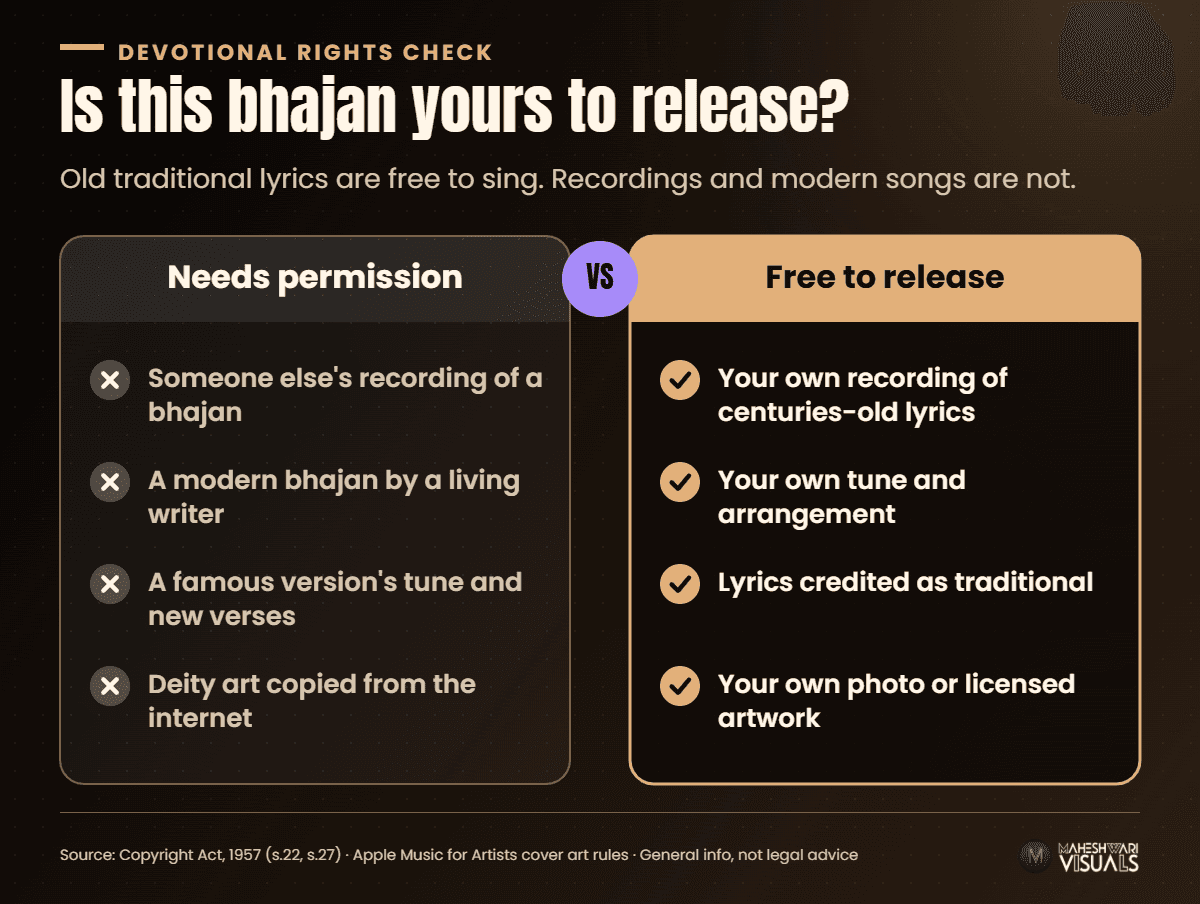
When you're unsure, check with the writer or a lawyer before you release. This guide is general information, not legal advice.
How to Release a Bhajan on Spotify: Step by Step
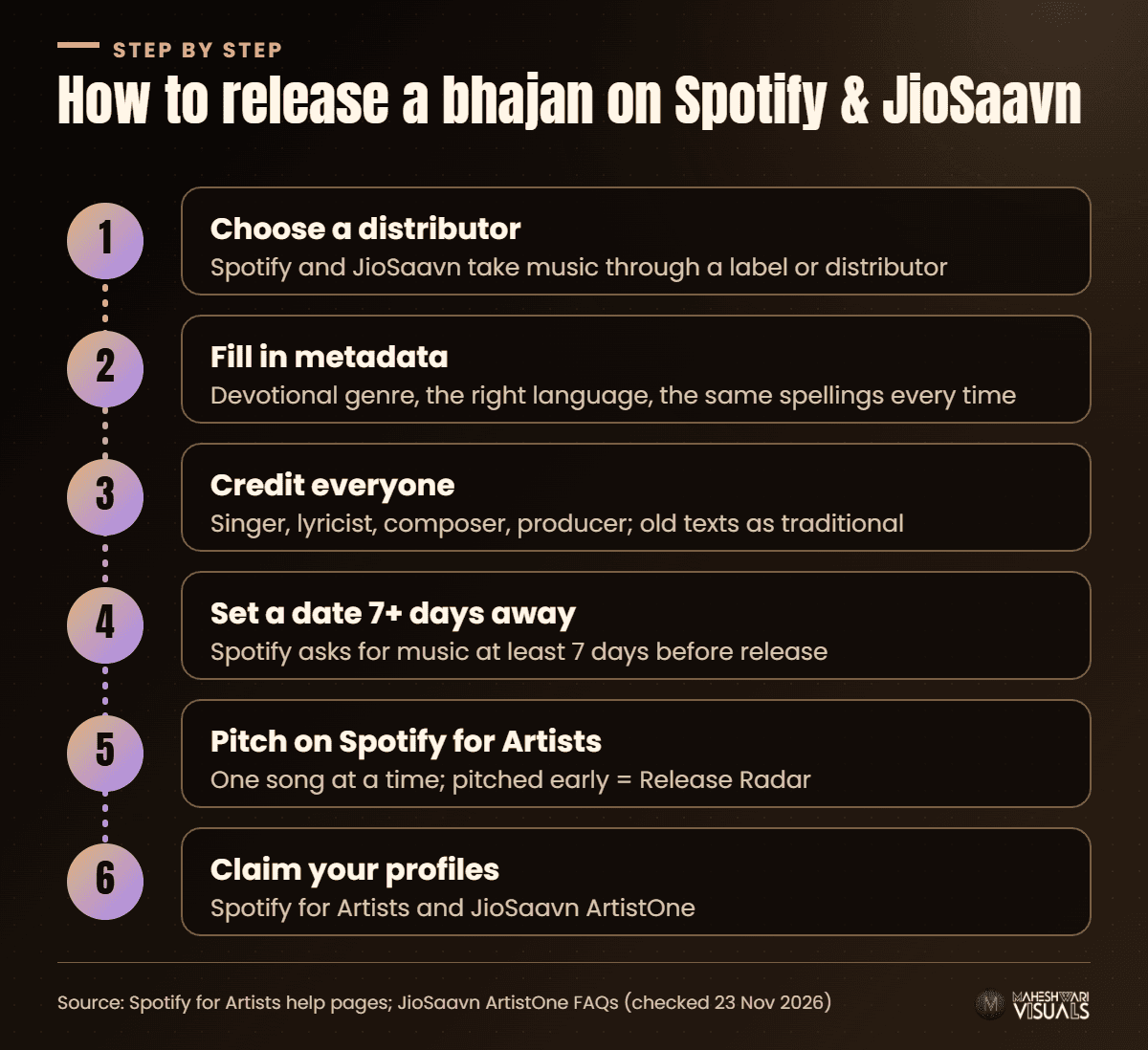
Once the rights are clear, the process is the same as for any single.
- Step 1: Choose a distributor. Spotify for Artists says you should work with a distributor, because distributors handle delivery and pay your streaming royalties. JioSaavn's ArtistOne FAQ also says your label or a content aggregator puts your music on the app.
- Step 2: Fill in the metadata carefully. Choose devotional as the genre and pick the right language: Hindi, Sanskrit, Marathi, Gujarati, Punjabi or whatever you sing in. Spell the deity's name and the song title the same way on the cover, the title and every later release.
- Step 3: Credit everyone. Add the singer, lyricist, composer and producer. For a traditional text, credit the lyrics as traditional rather than adding your own name as the writer.
- Step 4: Pick a release date at least 7 days away. Spotify asks for music to arrive at least 7 days early so its editors have time to listen.
- Step 5: Pitch it on Spotify for Artists. You can pitch one unreleased song at a time. If you pitch at least 7 days before release, Spotify adds the song to your followers' Release Radar. Pitching doesn't guarantee a playlist.
- Step 6: Claim your profiles. On JioSaavn, register on ArtistOne, verify your email, find your artist page (or paste a song link), add your social links and wait for the team to verify you. Our Spotify guide and JioSaavn guide show every screen.
Cover Art for Devotional Songs: Avoid These Mistakes
Many devotional releases get held up because of the artwork, not the music. Apple Music's cover art rules are a good standard for every store. Art must be a perfect square, at least 4000 x 4000 pixels, in JPG, PNG or GIF. Text should be limited to your artist name and the release title.
- Don't grab a deity image from the internet. Apple doesn't allow images owned by someone else without written permission. Use your own photo, your own illustration or artwork you've licensed.
- No dates or festival years on the art. Apple doesn't allow years or dates, so write "Janmashtami Special" in your promotion, not "2026" on the cover.
- No social handles, logos, websites or prices. Keep the cover clean.
- Keep it sharp. Blurry, stretched or badly cropped images are rejected.
Common Mistakes With Devotional Releases
- Uploading someone else's recording. Even if the bhajan is traditional, the audio belongs to whoever recorded it.
- Ten versions of the same aarti under the same title. If you record several, give each a clear, distinct title (for example "Hanuman Chalisa (Morning Version)") and never re-upload identical audio.
- Mixed-up artist profiles. Many devotional singers have similar names. JioSaavn's FAQ says that if your songs show up on another artist's page, your distributor has to resubmit the metadata. So check your artist name and profile link before every release.
- Releasing on the festival day itself. Upload the day you want it live and you lose the Spotify pitch and the Release Radar slot.
Tips to Grow Your Devotional Music
Devotional listeners come back every morning, so build habits, not one-off hits:
- Plan around the festival calendar. Navratri, Janmashtami, Ganesh Chaturthi, Mahashivratri and Diwali are when people search for new bhajans. Deliver your songs a few weeks ahead.
- Release a steady series. A weekly or monthly bhajan keeps your profile active and gives Release Radar something new to show your followers.
- Add lyrics. Many people sing along while they listen. Our synced lyrics guide shows how to get them on Spotify and Apple Music.
- Give fans one link. Share a single smart link to Spotify, JioSaavn, YouTube Music, Apple Music, Amazon Music and Gaana in your temple groups and WhatsApp communities.
Not sure what really matters on release day? Our short video below clears up five release myths that still trip artists up.
▶ Watch on YouTube: 5 Music Release Myths Artists Still Believe
How MV Distribution Helps Devotional Artists
MV Distribution delivers your bhajans to 100+ stores, including Spotify, Apple Music, JioSaavn, Amazon Music, YouTube Music, Gaana and Instagram, and releases go live within 24 hours. You keep 100% of your rights, and our support team replies within 24 hours if something gets stuck. More than 200K artists already release music with us. Releasing on Apple Music too? Our Apple Music guide covers the extra profile steps.
Conclusion: Your Bhakti Deserves a Proper Release
Three things matter most when you release a bhajan on Spotify, JioSaavn and other apps. First, check the rights: old traditional lyrics are free to sing in your own tune, but modern songs and other people's recordings are not. Second, clean metadata and original cover art stop most rejections and profile mix-ups. Third, give yourself at least 7 days, and plan around festivals, so you can pitch on Spotify and reach your listeners on time.
Your voice can be part of someone's morning prayer. When you're ready, sign up for MV Distribution and put your next bhajan on Spotify, JioSaavn, YouTube Music and 100+ more stores.
FAQs
How can I upload my bhajan on Spotify?
Spotify doesn't accept direct uploads. Release your bhajan through a music distributor, set a release date at least 7 days ahead, then claim your Spotify for Artists profile and pitch the song from the Upcoming section.
Can I release a traditional bhajan or aarti under my name?
You can release your own recording of lyrics that are out of copyright, such as centuries-old texts. But credit the lyrics as traditional, don't claim to have written them, and never use another singer's recording or a modern composer's tune without permission.
Do I need permission to sing a popular film bhajan?
Yes. A film or modern bhajan is protected, so releasing your version is a cover and needs the proper licence process. Read our cover-song guide before you release one.
Can I use a photo of a god from Google as my cover art?
No. Most images online belong to someone. Apple Music doesn't allow artwork owned by another copyright holder without written permission, so use your own photo, your own illustration or licensed art.
When should I release a bhajan for Navratri or Janmashtami?
Deliver it a few weeks before the festival, and at least 7 days before release day, so you can pitch it on Spotify and land in your followers' Release Radar when people start searching.
Sources: Copyright Act, 1957 — Chapter V, Sections 22 and 27; Spotify for Artists — Getting music on Spotify and Pitching music to playlist editors; JioSaavn ArtistOne FAQs; Apple Music for Artists — Cover art. All checked 23 November 2026.
Comments
Related Articles

How to Upload Your Song on Apple Music from India: Step-by-Step Guide for Independent Artists

Bhojpuri Song Distribution: How to Release Your Bhojpuri Song on Spotify, JioSaavn and YouTube
