
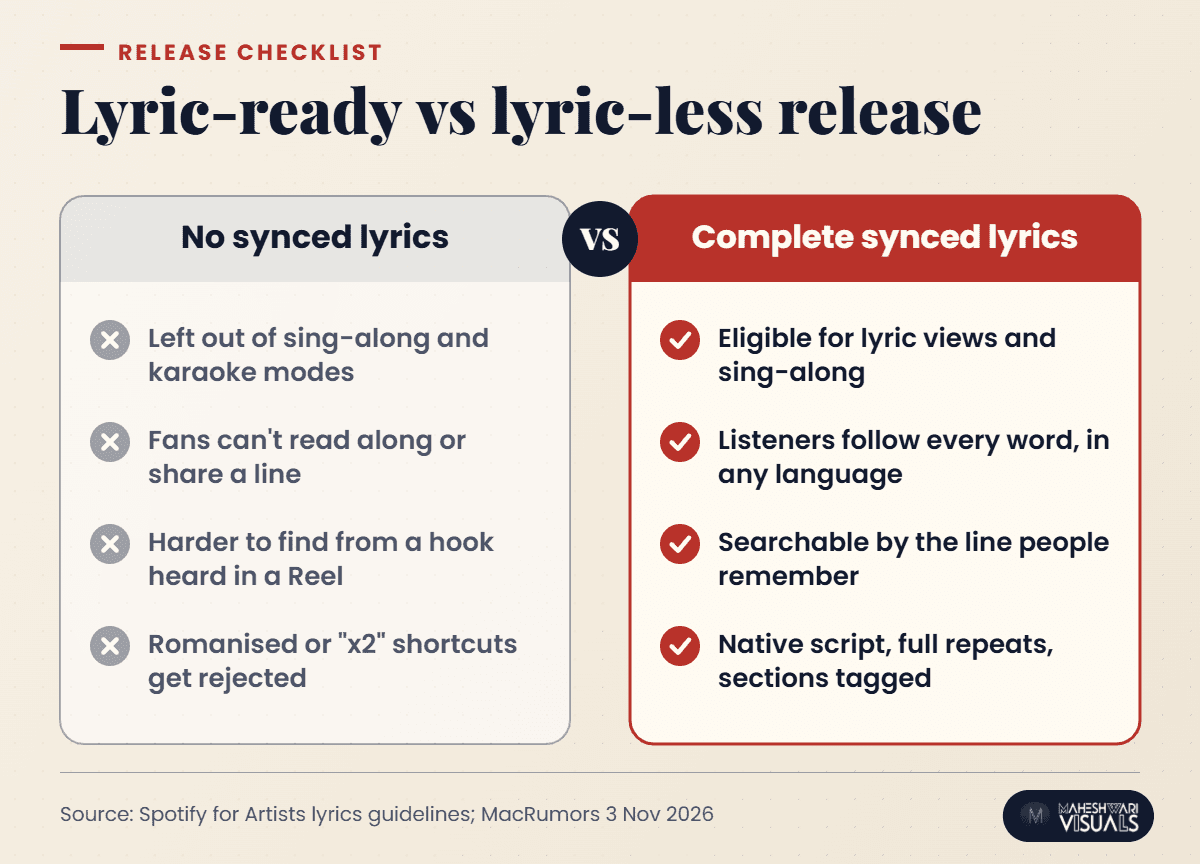
Earlier this month, Apple Music started testing a feature called Selfie Sing in the iOS 27.3 beta. Fans pick a song, flip to the front camera and record themselves singing while the lyrics scroll on screen, then save or share the clip. Here is the detail independent artists should notice: none of it works without synced lyrics. If your song has no time-coded lyrics, it can't join the karaoke moment.
Lyrics have quietly become one of the most useful tools for building fans on streaming. They keep listeners engaged and help people find your song after hearing one line in a Reel. They also get your words across to listeners who don't speak your language. This guide explains how to add synced lyrics to Spotify and other platforms as an Indian independent artist, what the formatting rules are, and the mistakes that keep good songs lyric-less.
What Apple Music's Selfie Sing tells us about lyrics
According to MacRumors (3 November 2026), Selfie Sing builds on Apple Music Sing, the karaoke mode Apple added in iOS 16.2. A dedicated Selfie Sing playlist already appears on iOS 27.2, but the camera option is only in the 27.3 beta for now, and not every song supports it. 9to5Mac (4 November 2026) reports that the same update also improves the landscape lyrics view, and expects iOS 27.3 to ship next month.
The bigger point isn't one Apple feature. Every major platform now treats lyrics as part of the listening experience, from scrolling lyrics on Spotify to sing-along modes and lyric stickers on short-form video. Songs with complete, correctly synced lyrics are the ones that get to take part.
Why synced lyrics matter for independent artists
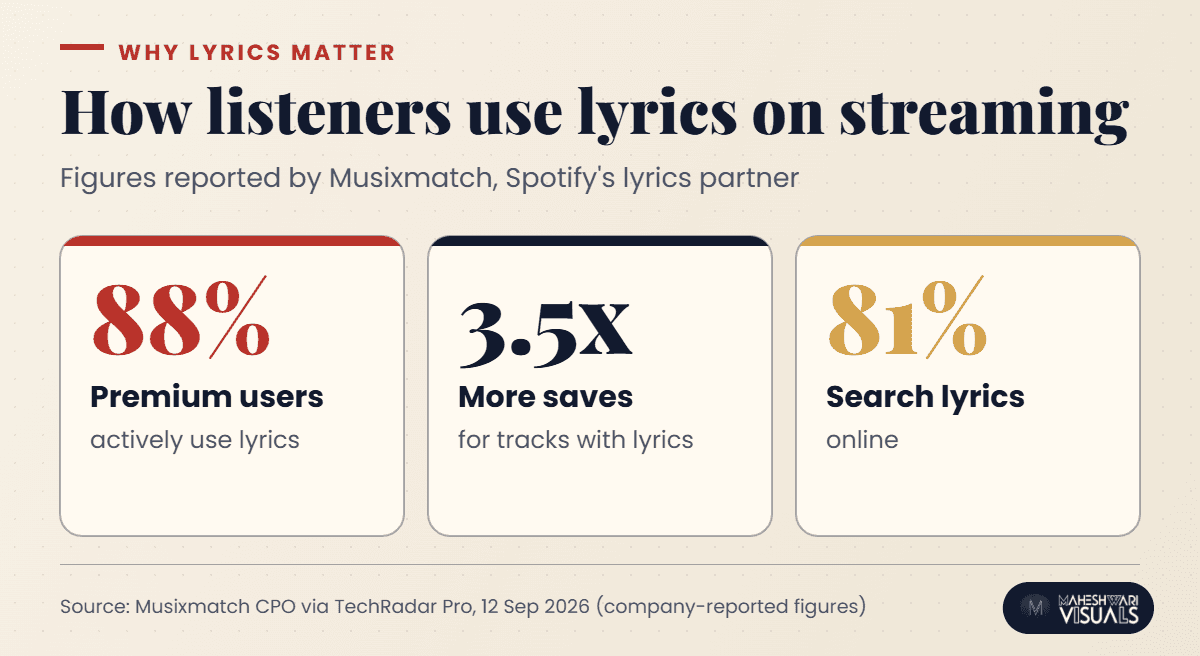
Musixmatch, which supplies licensed and synced lyrics to Spotify, has shared some striking numbers about how listeners use lyrics. In a TechRadar Pro interview (12 September 2026), its Chief Product Officer said 88% of premium subscribers actively use lyrics, that tracks with lyrics generate 3.5x more saves, and that 81% of listeners search for lyrics online. These are the company's own figures rather than an independent study, but they line up with what most artists see: people who read along tend to listen more closely.
For an Indian independent artist, that matters in three practical ways:
- Saves drive discovery. A save tells the platform that a listener wants to come back to your song, and that is the kind of signal that helps a track travel further.
- Lyrics help across languages. A Punjabi or Bhojpuri song can reach listeners who don't speak the language when they can follow the words, and translations go even further.
- Lyrics help people find you. Someone who hears a hook in a Reel often types that line into a search bar. Accurate lyrics make it far more likely they land on your song.
How to add synced lyrics to Spotify (step by step)
Spotify's own help page for artists, Managing your lyrics on Spotify, explains that Musixmatch provides licensed and synced lyrics for Spotify (PetitLyrics handles listeners in Japan). The process runs through Musixmatch Pro, and the free tier is enough to add, edit and sync lyrics.
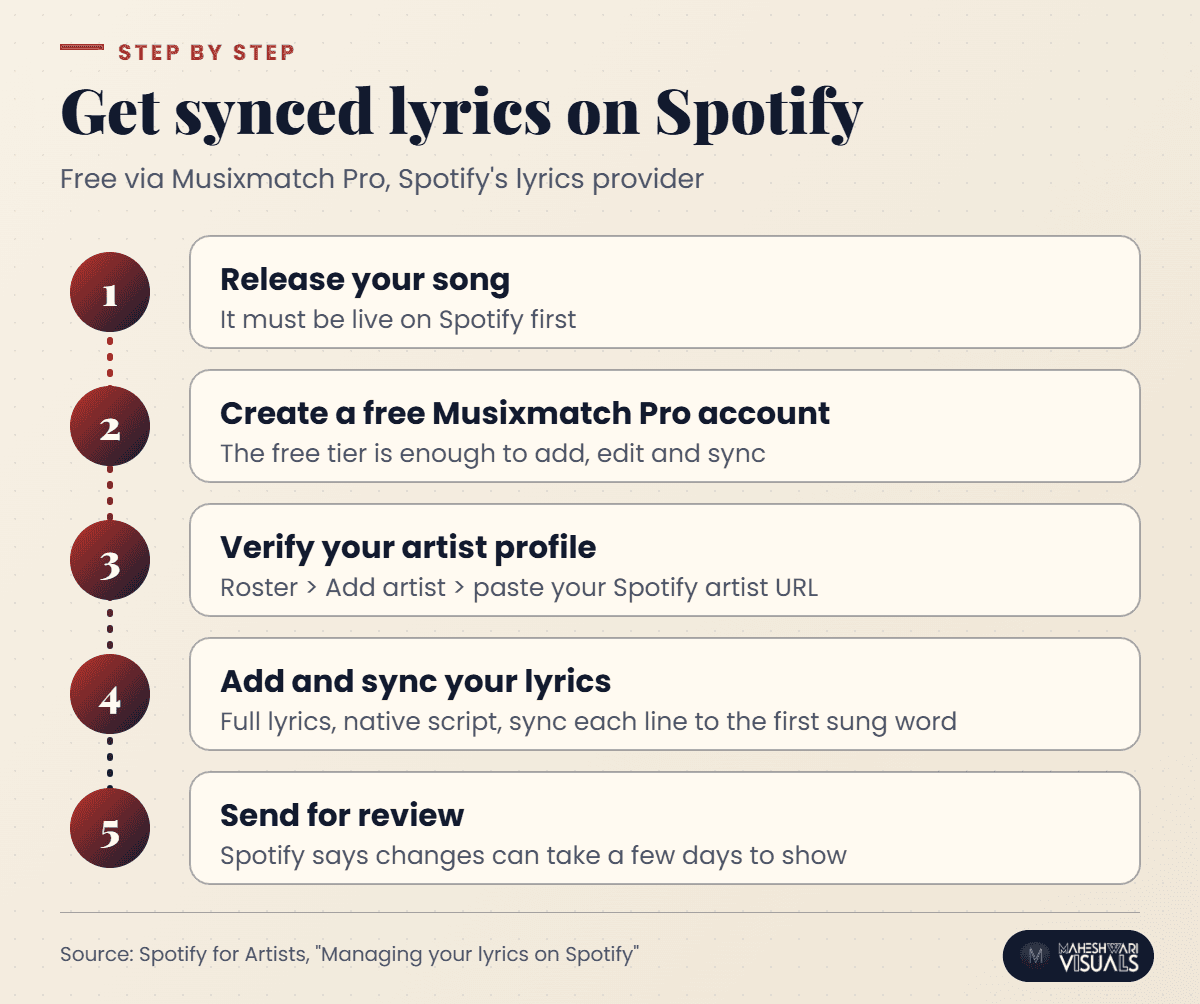
- Release your song first. Your track needs to be live on Spotify before you can claim it. With MV Distribution, releases go live on 100+ stores, including Spotify, JioSaavn, Apple Music, Amazon Music, YouTube Music and Gaana, usually within 24 hours.
- Create a free Musixmatch Pro account. Sign up with the email you'll use to manage your music.
- Verify your artist profile. In Musixmatch Pro, go to Roster, choose Add artist and paste your Spotify artist URL. Spotify says Musixmatch will email you within a few business days.
- Add and sync your lyrics. Type the full lyrics, then sync each line so it appears when the first word is sung. If a release is missing, the "Add missing release" option can take up to 48 hours to appear.
- Send and wait. Once you hit Send, Spotify notes it may take a few days for the changes to show.
The formatting rules most artists miss
Spotify's guidelines are specific, and getting them wrong is the most common reason lyrics are delayed or rejected:
- Transcribe the lyrics in full, including every repeated chorus. Don't write shortcuts like "x2".
- Only transcribe the words that are actually sung or rapped.
- Label sections with tags such as #VERSE and #CHORUS.
- Use the song's native script. A Hindi song should be in Devanagari and a Punjabi song in Gurmukhi, not romanised spellings.
- When syncing, follow the main vocal, not the backing vocals or ad-libs.
Lyrics beyond Spotify: one source, many platforms
Lyrics on most streaming services come from licensed lyric providers rather than straight from the audio files you deliver. Musixmatch says it distributes lyrics to 25+ platforms, so one clean, verified entry can travel a long way. Still, display varies from app to app. Some show time-synced lines, some show static text, and some only show lyrics for certain songs or regions.
The habit that helps most is to treat lyrics as part of your release checklist, not an afterthought:
- Finalise lyrics before mastering. Write them down while the session is fresh, with the exact words, repeats and language.
- Check every major app after release day. Open your song on Spotify, Apple Music, JioSaavn and YouTube Music, and note where lyrics are missing or wrong.
- Fix errors at the source. Correct them in Musixmatch Pro instead of hoping each platform notices separately.
Turn your lyrics into promotion
Once your lyrics are live, use them. Post a short clip of the hook with the lyric on screen, and invite fans to sing a line on Reels or Shorts. Pin the most quotable lyric in your bio during release week. When Selfie Sing rolls out more widely, ask fans to share their own karaoke takes. User-made clips like these are some of the most authentic promotion an independent artist can get.
If you'd like help planning release-week content around your strongest lines, the team at MV Marketing works with artists on campaigns that turn a song's best moments into shareable content. And if you haven't set up your official presence yet, our guide to the YouTube Official Artist Channel is a good next step.
Conclusion: make every release lyric-ready
Three things to take away. First, lyrics are no longer a nice extra: features like Apple Music Sing, Selfie Sing and Spotify's synced lyrics put them at the centre of how fans listen. Second, getting synced lyrics on Spotify is free and simple once your song is live: verify your profile in Musixmatch Pro, follow the formatting rules and use your song's native script. Third, lyrics only pay off when you check them on every major app after release and use them in your promotion.
You've already done the hard part by writing the song. Making sure listeners can read along takes a few extra minutes, and it can make a real difference. When you're ready to put your next release on Spotify, JioSaavn, Apple Music and 100+ other stores, sign up with Maheshwari Visuals for music distribution and get your music live, usually within 24 hours, while keeping 100% of your rights.
Frequently asked questions
How do I add lyrics to my song on Spotify?
Spotify uses Musixmatch for licensed and synced lyrics. Once your song is live, create a free Musixmatch Pro account, verify your artist profile with your Spotify artist URL, then add, sync and send your lyrics. Spotify says changes can take a few days to show.
Why are my lyrics not showing on Spotify?
Common reasons are an unverified Musixmatch profile, lyrics still under review, or formatting that breaks the guidelines, such as "x2" shortcuts or missing repeats. Lyrics also don't display for every song in every region. Check your submission status in Musixmatch Pro first.
Can I add lyrics in Hindi or Punjabi script?
Yes. Spotify's guidelines ask you to use the song's native script, so Hindi lyrics should be in Devanagari and Punjabi lyrics in Gurmukhi. This helps the right listeners find and follow your song.
What is Apple Music Selfie Sing?
It's a karaoke video feature being tested in the iOS 27.3 beta. Fans record themselves singing with the front camera while synced lyrics scroll, then save or share the video. It builds on Apple Music Sing, and not every song supports it yet.
Do I need to pay to add synced lyrics?
No. Spotify notes that the free tier of Musixmatch Pro is all you need to add, edit and sync lyrics.
Sources: MacRumors, "Apple Music's New Selfie Sing Feature" (3 November 2026); 9to5Mac, "iOS 27.3 upgrades Apple Music in two ways" (4 November 2026); Spotify for Artists, "Managing your lyrics on Spotify"; TechRadar Pro interview with Musixmatch (12 September 2026).


