
You can't drag an MP3 into Apple Music and press publish. If you want to know how to upload a song on Apple Music from India, the short answer is this: Apple asks independent artists to release through a music distributor, and then gives you a free tool, Apple Music for Artists, to claim your profile and see who is listening.
Quick answer: you need a finished master, square cover art of at least 4000 x 4000 pixels, correct metadata and a distributor. After your song has been live for at least five business days, you can claim your artist page in Apple Music for Artists. Apple says you'll get updates by email while it checks your request.
This guide walks you through each step, using Apple's own help pages (checked on 21 November 2026). It also covers the artwork and metadata mistakes that most often hold a release back.
How to Upload a Song on Apple Music: What You Need First
Apple's help page on getting your next release onto Apple Music tells artists to partner with a distributor. Your distributor delivers the audio, artwork and metadata to Apple. It also handles corrections and pays out your royalties. Apple sends artists to their distributor for questions about money and metadata.
Before you start, keep these ready:
- Final master audio in the format your distributor asks for (usually WAV)
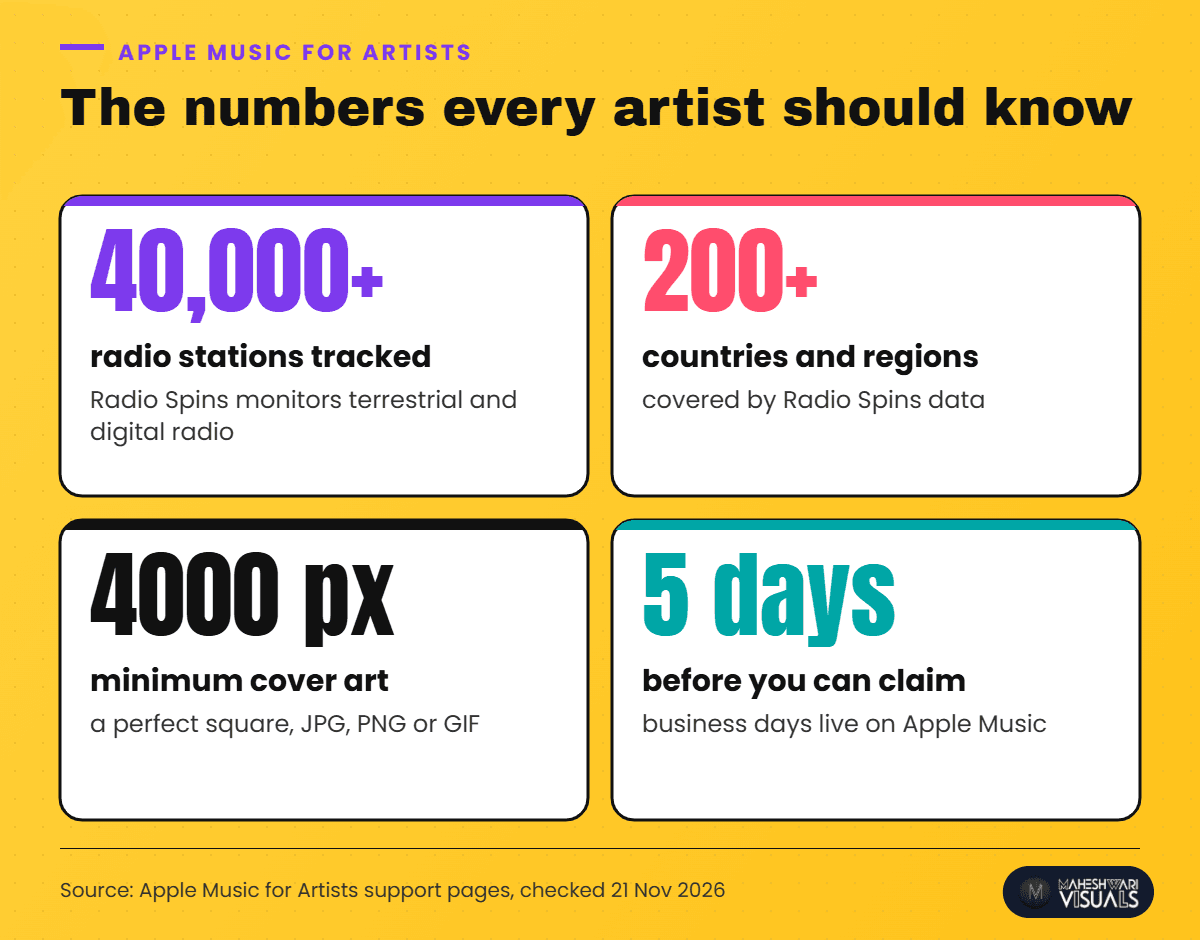
- Cover art: a perfect square, at least 4000 x 4000 pixels, in JPG, PNG or GIF
- Exact artist name, spelled the same way on every release, plus any featured artists
- Song title and release date, checked twice before you deliver
- Credits for everyone who worked on the track (Apple asks for all personnel to be credited)
- Genre, chosen carefully. Apple's own advice for secondary details like genre and mood is that "less is more"
If you've released on other stores before, use exactly the same artist name. That way every store links the new song to the right profile. Our Spotify upload guide for Indian artists explains why a consistent name matters on every platform.
Step-by-Step: Getting Your Song Live on Apple Music
Step 1: Choose your distributor
Pick a distributor that delivers to Apple Music and Indian stores together. One release can then reach Apple Music, Spotify, JioSaavn, Amazon Music, YouTube Music and Gaana at the same time. Apple's partner page also suggests looking for a distributor that supports detailed credits and lyrics and has a low rejection rate.
Step 2: Prepare artwork that passes Apple's rules
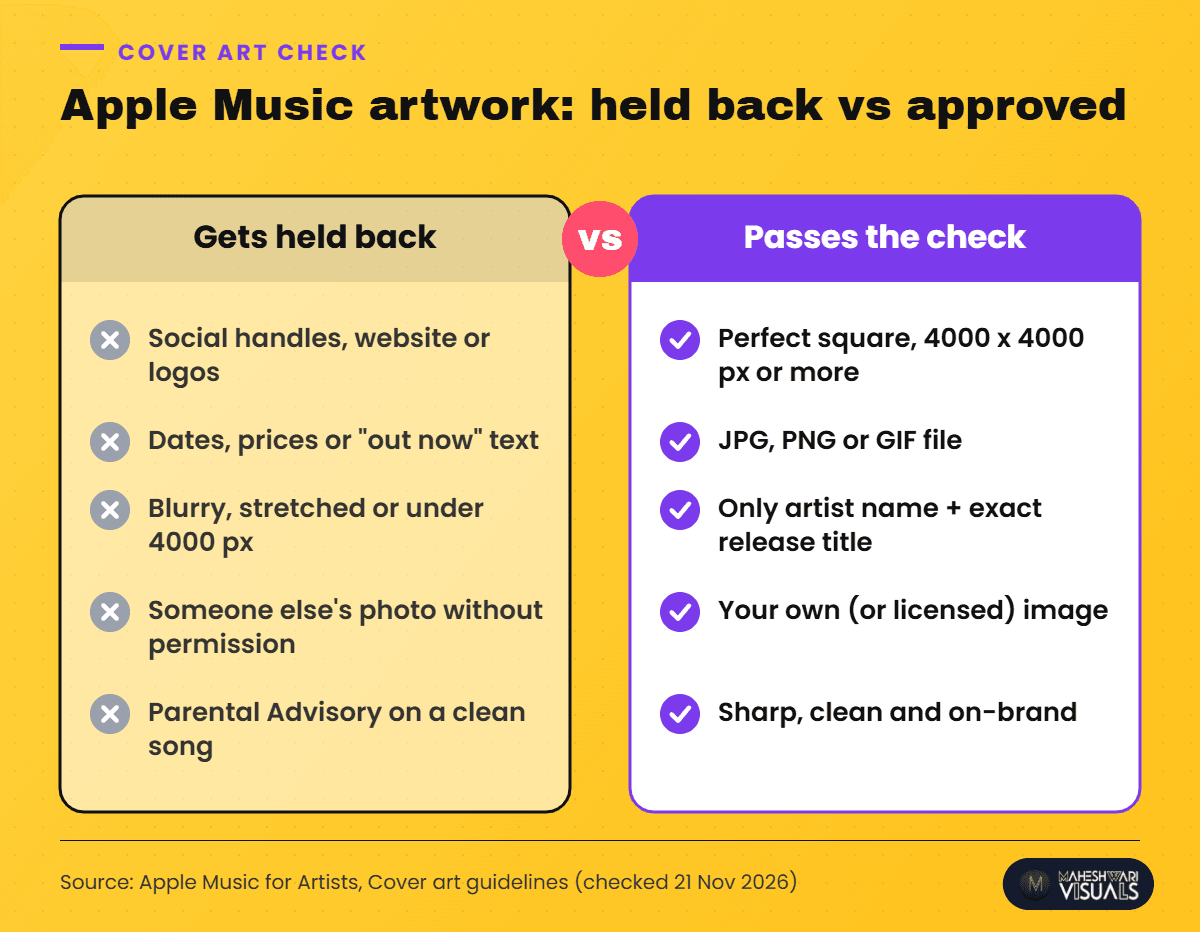
Most first-time releases slip on artwork, so get this right before you upload. Apple's cover art guidelines allow the artist name and the exact release title on the cover, and not much else.
Step 3: Fill in the metadata carefully
Enter the primary artist, featured artists, song title, release date and track numbers. Write Hindi, Punjabi or Bhojpuri titles the same way everywhere. A spelling change can create a second, empty artist profile. Apple says corrections go through your label or distributor, so it's much easier to get the details right the first time.
Step 4: Deliver early and set your release date
Apple's pages don't give one fixed lead time. Give yourself a buffer anyway, so you have room to fix any problems and plan your promotion. With MV Distribution, a release can go live within 24 hours. For a planned launch, though, upload a couple of weeks ahead.
Step 5: Claim your Apple Music for Artists profile
Once the song has been live for five business days, claim your artist page. Only the artist or the artist's manager can do this. A label rep has to be added by them or have their request reviewed.
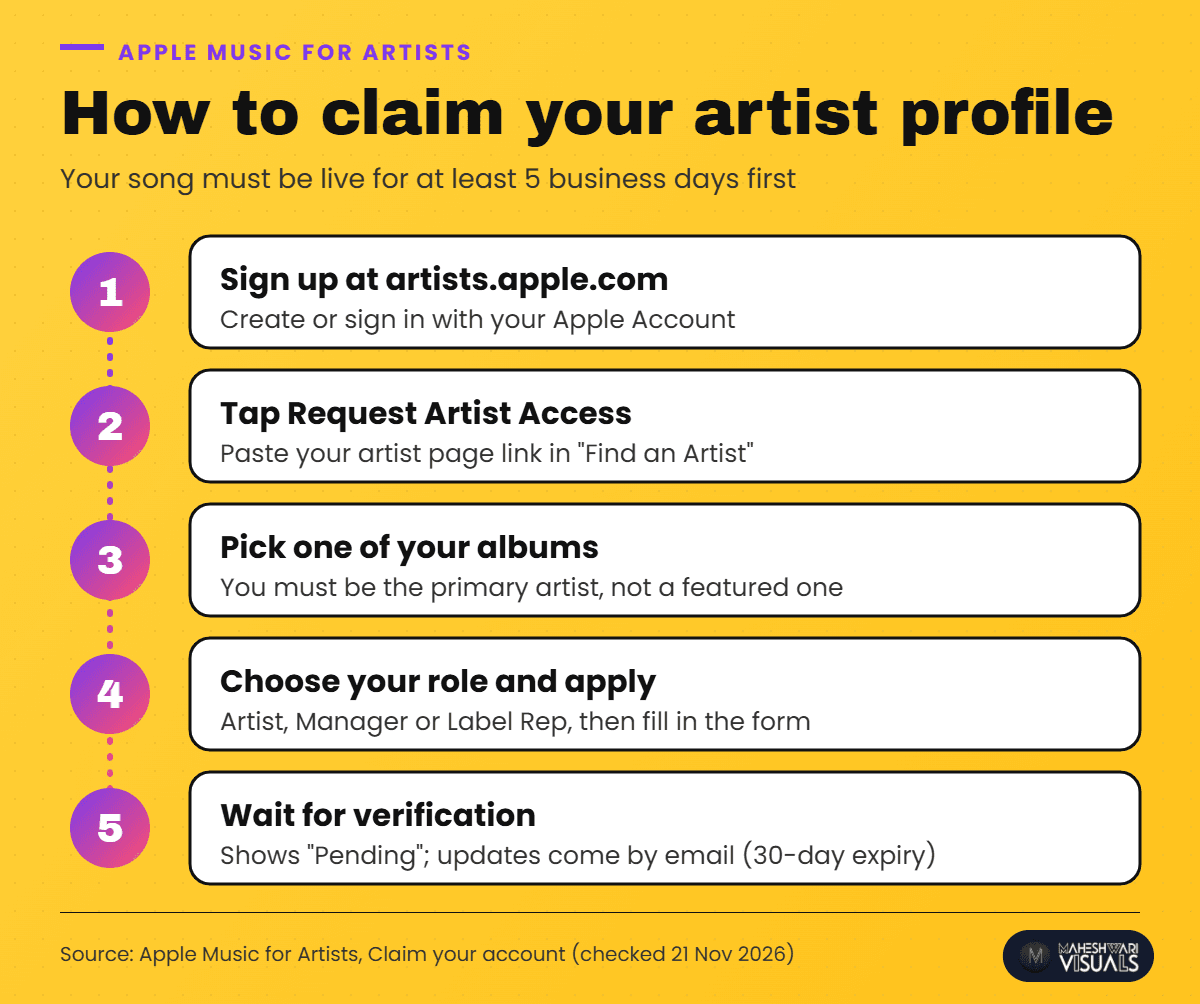
Your request shows as "Pending" while Apple checks it. Signing in with your social media or distributor accounts can make verification faster. Requests expire if no artist or manager admin acts within 30 days, so keep an eye on your inbox.
What You Get Inside Apple Music for Artists
Claiming your profile is free, and the data is useful. Apple Music for Artists shows plays (counted after 30 seconds), average daily listeners, Shazam counts, iTunes purchases, video views and Radio Spins. Radio Spins tracks your song across more than 40,000 radio stations.
You can also see which cities and countries your listeners are in, and download the data as a CSV file. Apple says new data takes about 48 hours to show up. Don't panic if release day looks empty at first.
You can also add an artist image, a logo and lyrics to your profile. Apple also offers promotion tools such as badges, share links and pre-adds. If lyrics are next on your list, our guide to adding synced lyrics on Spotify and Apple Music explains how.
Common Mistakes That Delay an Apple Music Release
- Social handles, website or logos on the cover. Apple doesn't allow these on cover art.
- Dates, prices or "out now" text on the artwork. These also go against the guidelines.
- Blurry or stretched images, or artwork smaller than 4000 x 4000 pixels.
- Using someone else's photo or design without written permission.
- A Parental Advisory logo on a clean song. Only explicit releases should carry it.
- A different artist spelling from your earlier releases, which splits your catalogue across two profiles.
- Trying to claim the profile as a featured artist. Only the primary artist (or their manager) can claim it.
Tips to Grow Your Listeners on Apple Music
Apple Music listeners in India often find songs through other apps and social media. So make your Apple Music link easy to find. Put it in your Instagram bio and YouTube descriptions, and on a single fan link page that lists every store.
We show how to build that page in our short tutorial below. You can build one for each release right from your MV dashboard.
▶ Watch on YouTube: Fan Link Kaise Banayein? | One Smart Link for All Your Music Platforms | MV Dashboard
Check your Shazam count and Places data after each release. If a city starts showing up, plan your next reel, collab or show around it. Release regularly, too. Each new song gives Apple Music listeners another reason to follow you.
How MV Distribution Helps
MV Distribution sends your music to 100+ stores, including Apple Music, Spotify, JioSaavn, Amazon Music, YouTube Music, Gaana and Instagram, from one upload. Your release can go live within 24 hours. You keep 100% of your rights, and a real person on our support team replies within 24 hours if your artwork or metadata needs a fix. More than 200,000 artists already trust us with their releases.
If you're also planning a JioSaavn launch, read our JioSaavn upload and verification guide next.
Conclusion
Learning how to upload a song on Apple Music is mostly about preparation. Get your artwork and metadata right before you deliver. Release through a distributor. Then claim your Apple Music for Artists profile once your song has been live for five business days, so you can watch your plays, Shazams and radio spins grow.
Every big catalogue began with one carefully released song. Yours can be next. [Sign up for MV Distribution](https://dashboard.maheshwarivisuals.com/signup) and get your music on Apple Music and 100+ other stores, with your rights fully yours.
FAQs
Can I upload my song directly to Apple Music from India?
Apple asks independent artists and small labels to release through a distributor. The distributor delivers your music to Apple Music and pays you your royalties.
How long after release can I claim my Apple Music for Artists profile?
Your music must be live on Apple Music for at least five business days. After that, you can request access at artists.apple.com with your artist page link.
What size should Apple Music cover art be?
It should be a perfect square of at least 4000 x 4000 pixels, in JPG, PNG or GIF. Keep the text to your artist name and the release title.
Is Apple Music for Artists free?
Yes. Claiming your profile is free, and you get plays, listeners, Shazam counts, radio spins and location data. For royalty questions, Apple sends you to your distributor.
Why is my song on the wrong Apple Music artist page?
Usually the artist name in the metadata didn't match your earlier releases. Ask your distributor to fix the metadata, because Apple sends all corrections through them.
Sources: Apple Music for Artists support, Claim your account, Get your next release on Apple Music, Cover art guidelines, Music metadata and Understand your analytics, all checked 21 November 2026.
Comments
Related Articles

Bhojpuri Song Distribution: How to Release Your Bhojpuri Song on Spotify, JioSaavn and YouTube

How to Upload Your Song on Spotify from India: Step-by-Step Guide for Independent Artists
