
Spotify does not have an upload button for artists. That surprises a lot of first-time musicians, but it is the single most important thing to know if you are searching for how to upload a song on Spotify from India. Every track on Spotify arrives through a distributor or a label, and the rest of the process — your verified profile, your pitch to editors, your Release Radar spot — builds on that first delivery.
Quick answer: you need a finished master (audio file), square cover art, correct song details (metadata) and a distributor such as MV Distribution. Deliver the release at least 7 days before your release date so you can pitch it to Spotify's editors, then claim your Spotify for Artists profile. Below: each step, the common mistakes, and how to grow once you're live.
Can you upload a song to Spotify directly from India?
No. Spotify's help page for artists says distributors deliver music and pay out streaming royalties, and asks artists to use one. If you're signed, your label probably already works with one.
For an independent artist anywhere in India, choosing a distributor is step zero. A good distributor sends the same release to Spotify and to Indian platforms like JioSaavn, Gaana, Amazon Music and YouTube Music at the same time, so one upload covers all of them. (Next stop JioSaavn? See our JioSaavn upload guide.)
What you need before you upload
- Final master: a mixed and mastered audio file, with no tags or watermarks.
- Cover art: a sharp square image with no website links or logos you don't own.
- Metadata: song title, primary artist name (spelled exactly the same on every release), featured artists, language, genre, and songwriter and producer credits.
- Rights: you must own the song or have permission. Cover songs and samples need licences first.
- A release date: pick one at least 2–3 weeks away so you have time to pitch and promote.
How to upload your song on Spotify India: step by step
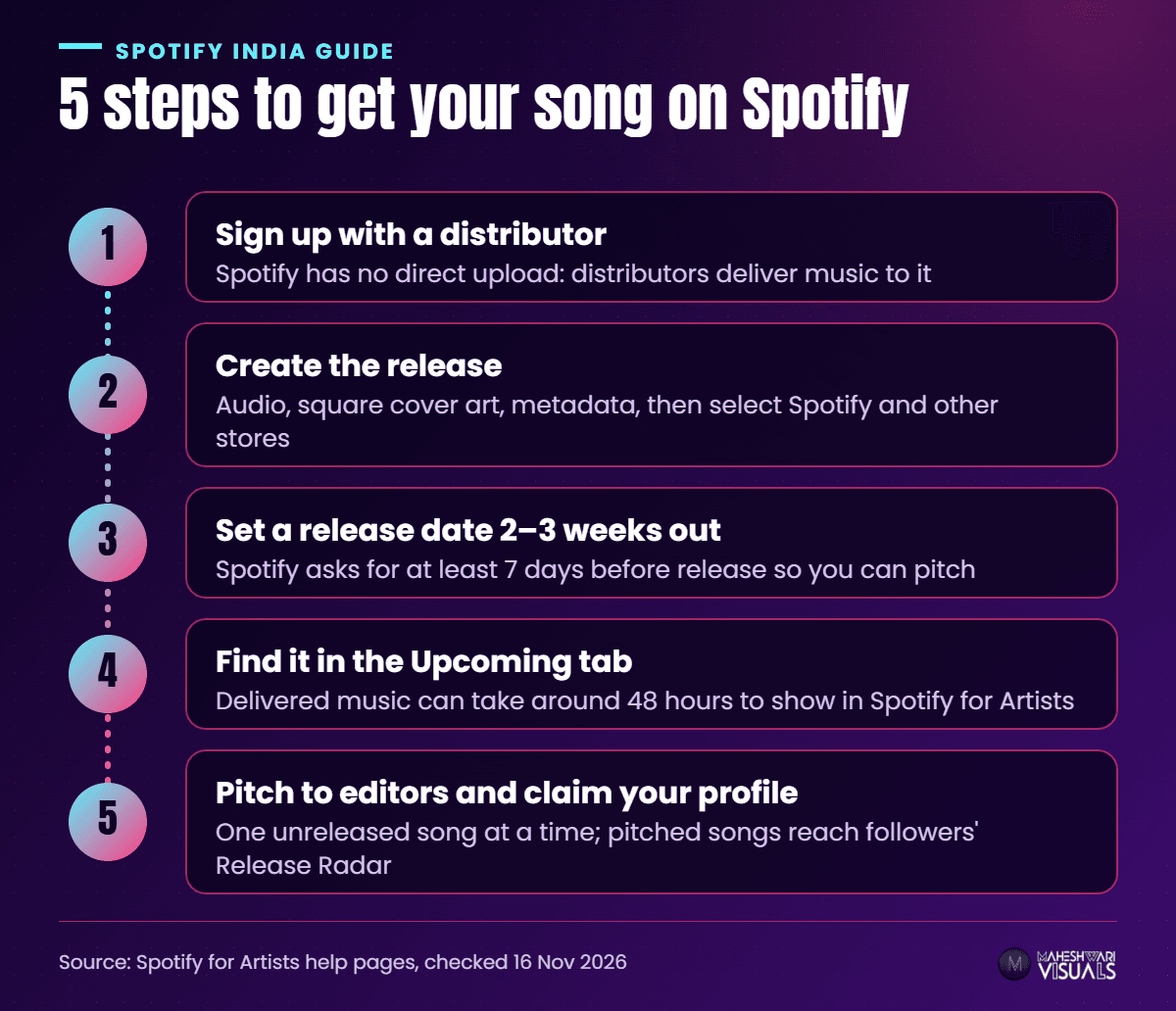
- Step 1: Sign up with a distributor. Create your account and complete your artist details. Use the same artist name you will use everywhere else.
- Step 2: Create the release. Upload the audio and cover art, fill in the metadata, and select Spotify along with the other stores you want.
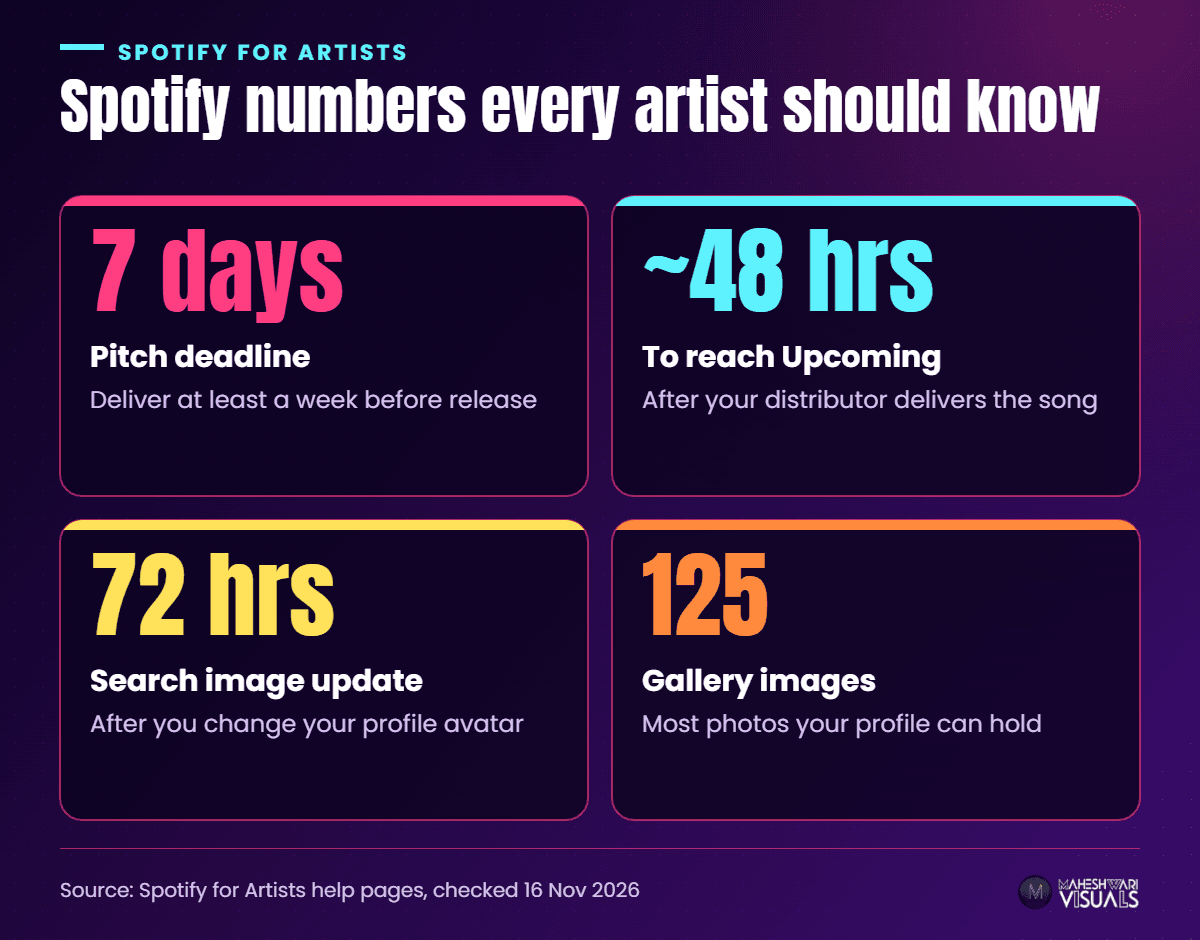
- Step 3: Set the release date. Spotify recommends delivering at least 7 days before release so editors have time to listen. Delivering earlier gives you more breathing room.
- Step 4: Find your song in the Upcoming tab. Spotify says delivered music can take around 48 hours to appear under Music → Upcoming in Spotify for Artists.
- Step 5: Pitch the song to editors. In Spotify for Artists, open Music → Upcoming, choose the song and fill in the pitch form — genre, mood, instruments, the story behind the track. More detail gives editors more to work with.
How to claim your Spotify for Artists profile
Once your first release is delivered, you have an artist profile on Spotify. Claiming it gives you access to Spotify for Artists — stats, pitching, profile images — and Spotify marks claimed profiles with a blue check mark.
- If you release through a distributor, you can get access when you submit a request in Spotify for Artists.
- If you're claiming the profile yourself, submit a request. Spotify reviews it manually and says it might take a few days. Verification happens through your social media accounts, so keep your Instagram and YouTube links handy.
- Joining before your first release? Ask your distributor for your Spotify artist link (spotify.com/artist/…) or URI and paste it on the "Which artist team is it?" page.
Once you're in, update your images from a desktop browser: the avatar shows in the app and in search (a new search image can take up to 72 hours), the header on desktop and smart TVs, and the gallery holds up to 125 images.
Verified badge vs blue check mark
Spotify also has a separate "Verified by Spotify" badge with stricter criteria: sustained listener activity (for example, 10K+ monthly listeners over three consecutive months and 1K+ followers), no spam or impersonation, and an authentic profile with a real bio and linked socials. Profiles that mainly represent AI-generated artists aren't currently eligible, and meeting the criteria doesn't guarantee approval.
Pitching to Spotify editorial playlists: the rules that matter
Pitching is free, but the rules are strict:
- One song at a time. Once that song is live, you can pitch the next one.
- Only unreleased music can be pitched, and you can't pitch compilations or songs where you are only a featured artist.
- Release Radar: pitch at least 7 days before release and Spotify adds the song to your followers' Release Radar playlists — so every follower counts.
- No guarantees: Spotify is clear that pitching does not guarantee a spot on an editorial playlist.
We cover how to write a strong pitch in our Playlist Pitching tutorial below — it also shows how MV's own pitching request works from the dashboard.
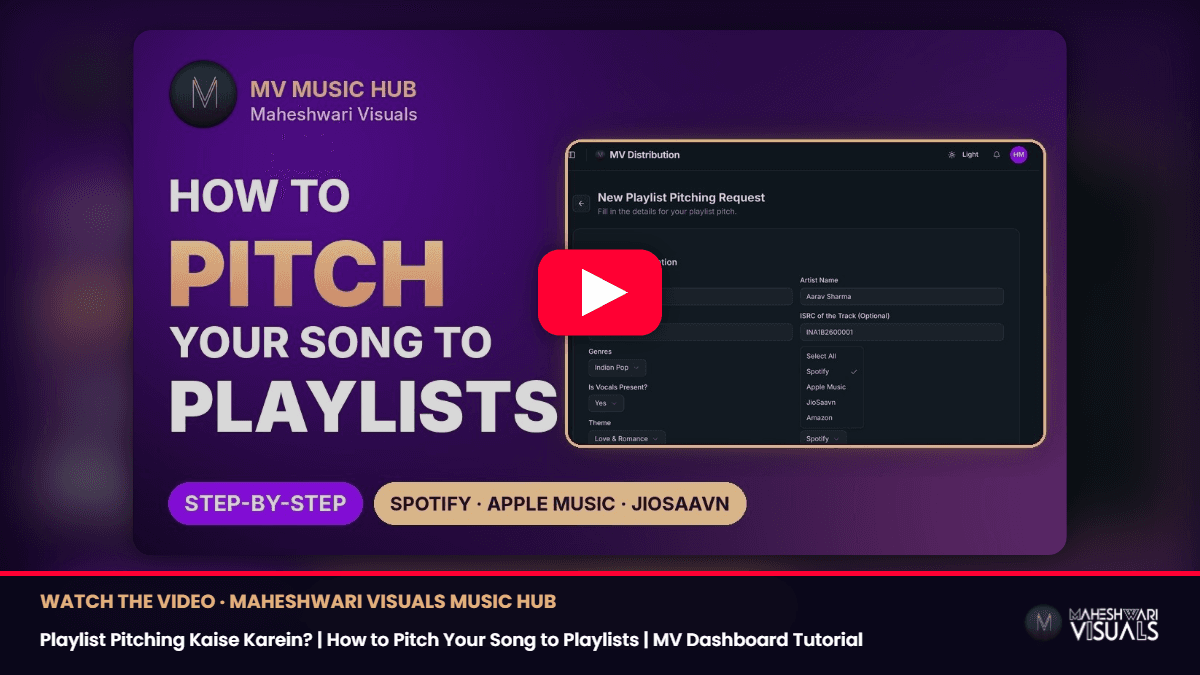
▶ Watch on YouTube: Playlist Pitching Kaise Karein? | How to Pitch Your Song to Playlists | MV Dashboard Tutorial
Common mistakes that delay Spotify releases
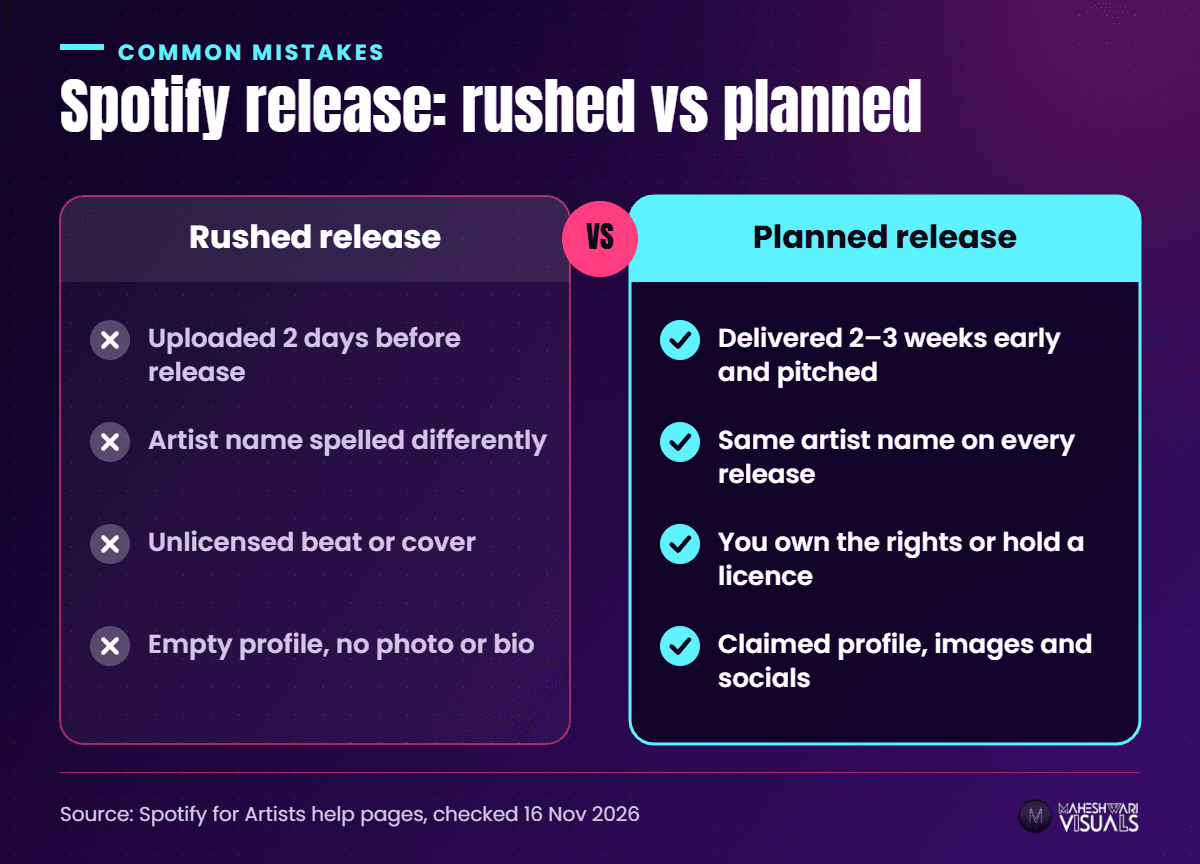
- Uploading two days before release. You lose the pitch window and Release Radar. Give it a week minimum — ideally three.
- Spelling your name differently. "Raju Beats" on one song and "RajuBeats" on the next can create two profiles, splitting your streams and followers.
- Unlicensed beats or covers. Releases that use music you don't have rights to can be removed. Get licences first — our guide to releasing a cover song legally in India explains how.
- Ignoring your profile. No photo, bio or social links looks unfinished to fans and editors.
Tips to grow on Spotify after release
- Ask fans to follow your profile, not just play the song — followers get your next release in Release Radar.
- Add lyrics. Synced lyrics help fans sing along; see our synced lyrics guide.
- Release regularly. A steady schedule — say one single every 6–8 weeks — gives you a fresh pitch each time.
How MV Distribution helps you get on Spotify
MV Distribution delivers your music to Spotify and 100+ other stores — including Apple Music, JioSaavn, Amazon Music, YouTube Music, Gaana and Instagram — from one dashboard. Releases go live within 24 hours, you keep 100% of your rights, and our human support team replies within 24 hours if anything gets stuck. More than 200K artists already trust us with their releases, and our playlist pitching service can add an extra push alongside your own Spotify pitch.
Conclusion
Getting on Spotify from India comes down to three things: a distributor to deliver your song, an early release date so you can pitch editors and land in Release Radar, and a claimed, complete Spotify for Artists profile that turns new listeners into followers.
Your song deserves to be heard in every city, on every phone. When you're ready, sign up with MV Distribution and send your next release to Spotify and 100+ stores.
FAQs
Can I upload a song on Spotify for free from India?
You can't upload directly — you need a distributor or label. Most distributors charge a fee or commission, so compare what each includes.
How long does it take for a song to appear on Spotify?
It depends on your distributor and the release date you choose. Spotify says delivered music can take around 48 hours to show in the Upcoming tab, and it recommends delivering at least 7 days before release if you want to pitch.
How do I get the blue tick on Spotify?
Claim your profile through Spotify for Artists. Claimed profiles get a blue check mark after Spotify's manual review, which can take a few days. The separate "Verified by Spotify" badge needs sustained listeners and followers.
Can I pitch an already released song to Spotify playlists?
No. Spotify only accepts pitches for unreleased music, one song at a time. That's why setting your release date at least a week ahead matters.
Source: Spotify for Artists help — Getting music on Spotify, Getting access to Spotify for Artists, Pitching music to playlist editors, Verified by Spotify, Unreleased music in Spotify for Artists and Managing your artist images — all checked 16 Nov 2026.
Comments
Related Articles

How to Upload Your Song on Apple Music from India: Step-by-Step Guide for Independent Artists

Bhojpuri Song Distribution: How to Release Your Bhojpuri Song on Spotify, JioSaavn and YouTube
