
Your song can be playing on someone's phone in Mumbai, a laptop in Dubai and an Echo speaker in a Delhi living room, all through Amazon Music. But Amazon Music has no "upload" button for artists. If you have been searching how to upload a song on Amazon Music, here is the quick answer: you release through a music distributor, then claim your free Amazon Music for Artists profile to control how you look and to pitch your new songs.
Quick answer: You need a finished master, square cover art and clean metadata, plus a distributor such as MV Distribution to deliver it. Once the release is live, you claim your profile and Amazon reviews the claim.
Below: every step, the mistakes that put songs on the wrong profile, and Amazon's Pitch Tool, all taken from Amazon Music for Artists' own help pages (checked 25 November 2026).
How Music Gets onto Amazon Music
Amazon Music doesn't accept files from individual artists. According to its help centre, music reaches the platform from music aggregators and labels through industry-standard DDEX delivery feeds. Whatever your distributor sends, Amazon shows: a misspelt artist name, a wrong primary artist or a missing featured credit in the feed is the most common reason music lands on the wrong profile.
What you need before you release
- A final master in high-quality WAV, with no extra silence at the start.
- Clean square cover art that matches the release title and artist name.
- Exact artist names spelt the same way on every release, including featured artists.
- A release date at least a week or two away, so you have time to pitch.
How to Upload Your Song on Amazon Music, Step by Step
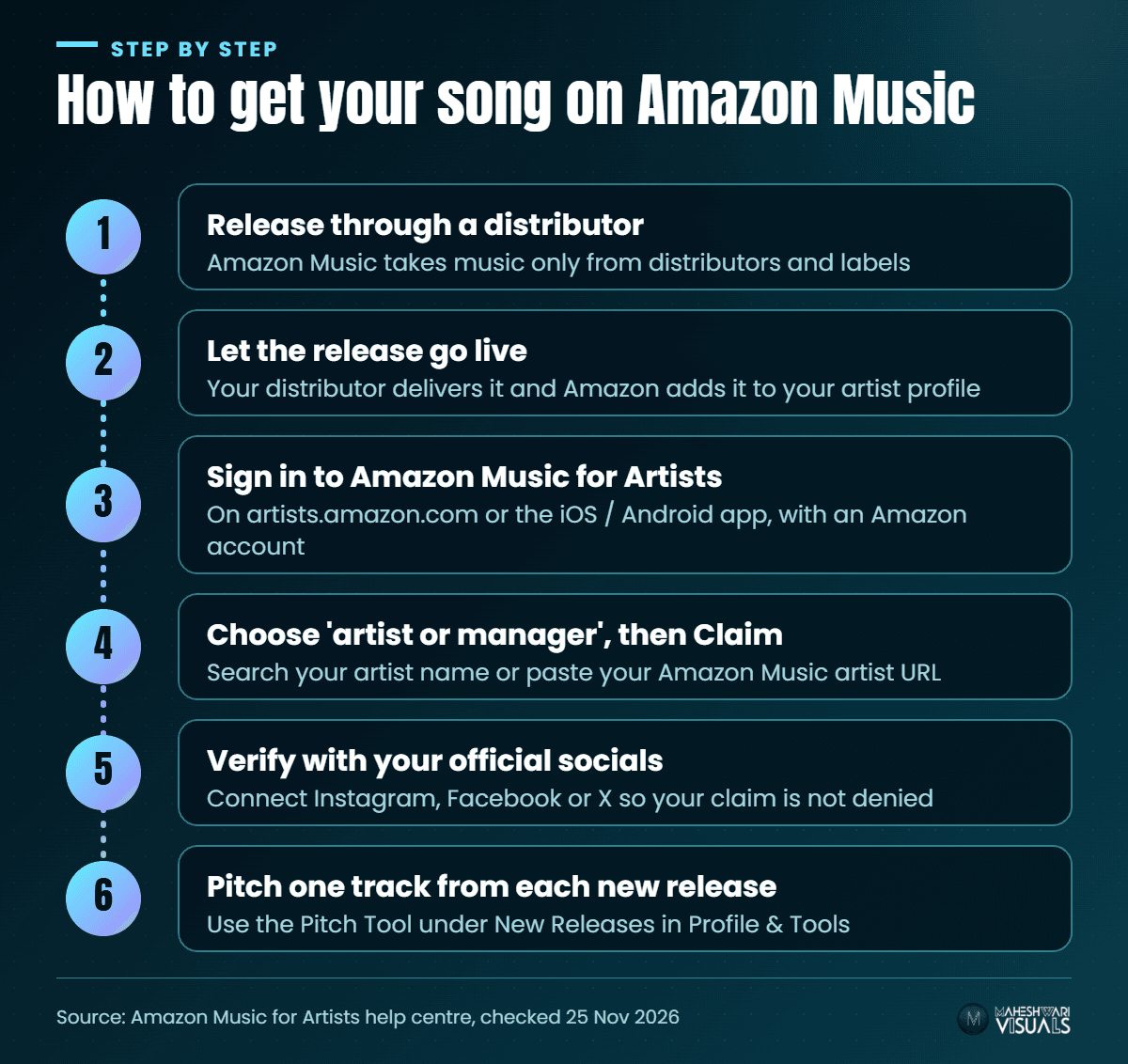
- Step 1: Choose a distributor. Sign up with a distributor that delivers to Amazon Music. With MV Distribution, one release goes to 100+ stores, including Amazon Music, Spotify, Apple Music, JioSaavn, YouTube Music and Gaana.
- Step 2: Upload your release. Add audio, artwork, title, language and credits, and double-check the artist name spelling.
- Step 3: Let it go live. Once Amazon processes the delivery, your release appears on Amazon Music.
- Step 4: Sign in to Amazon Music for Artists. Use the web dashboard at artists.amazon.com or the iOS or Android app. Sign in with an Amazon shopping account.
- Step 5: Choose "artist or manager". On first sign-in, pick the artist or manager tile, not the label or distributor one.
- Step 6: Find and claim your profile. Search for your artist name or paste your Amazon Music artist URL. Select your profile and click Claim.
- Step 7: Verify who you are. Add your company or team name and role, then connect your official social accounts (Instagram, Facebook or X) so Amazon can confirm you are really the artist. The help page warns that leaving verification blank greatly increases the chance your claim is denied.
Make Your Amazon Music Profile Look Professional
Profile owners and admins can update images from Profile & Tools:
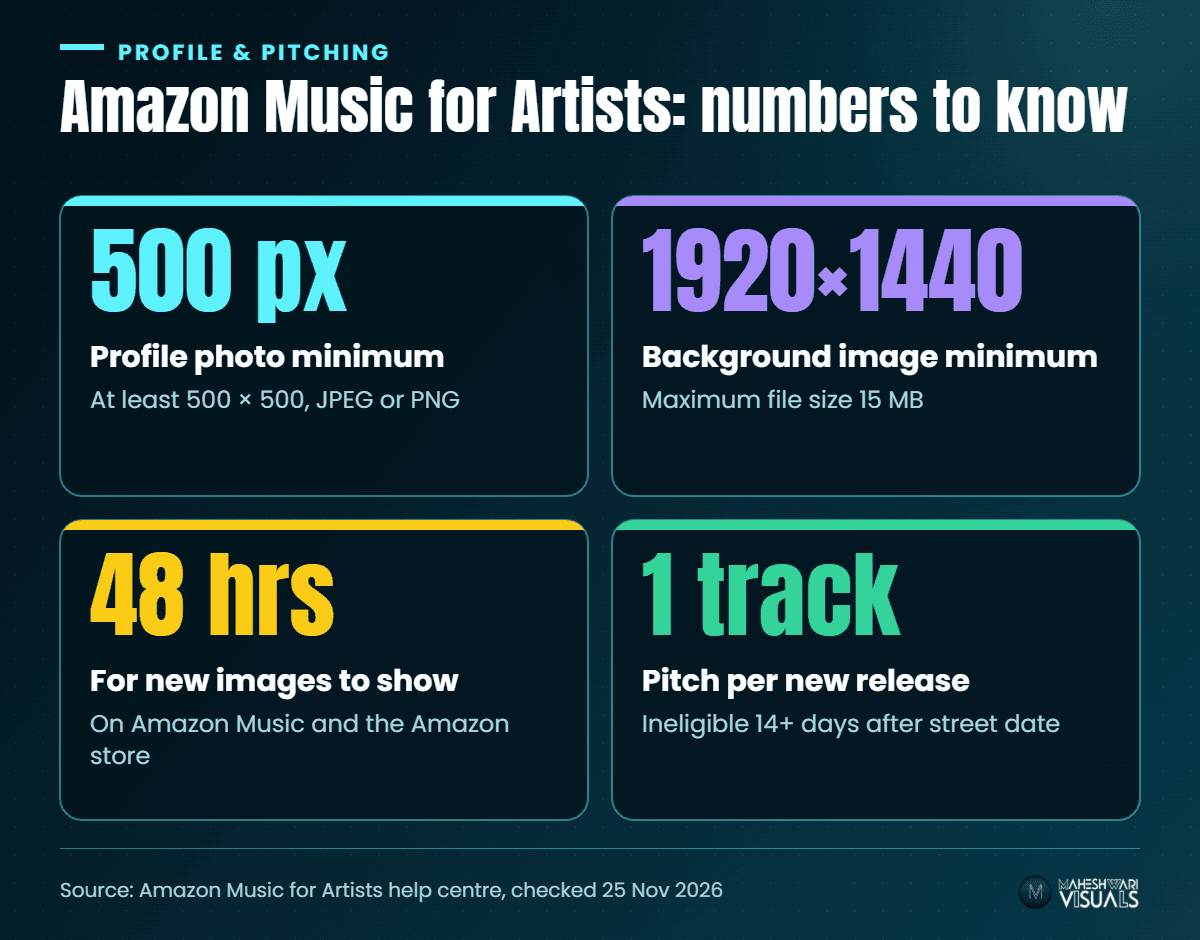
- Profile photo: JPEG or PNG, at least 500 × 500 pixels.
- Background image: at least 1920 × 1440 pixels.
- File size: up to 15 MB, with no text, logos or very busy designs.
- Timing: new images take about 48 hours to show on Amazon Music and the Amazon store.
Bios are licensed from a third-party data provider, so you can't edit them in the app.
Pitch Your New Song with Amazon's Pitch Tool
Amazon Music for Artists has its own Pitch Tool for new releases. Once your release has been delivered, it shows up under New Releases in Profile & Tools. Then:
- An owner or admin can pitch one track per new release.
- Pitches are global. Use the open text box to mention India-specific plans, such as a regional radio push, a festival tie-in or a big Reels campaign.
- You can't edit a pitch after sending it, and Amazon shows no review status, so write it carefully the first time.
- The help page lists a release as no longer eligible once it is more than 14 days past its street date, so pitch as early as you can.
If your release doesn't appear in New Releases more than 24 hours after delivery, Amazon suggests checking with your distributor, checking that the release is eligible, and checking for profile mapping problems. A pitch is a request, not a promise, so keep promoting the song yourself.
Our Playlist Pitching tutorial below shows how to write a strong editorial pitch, and the same habits work on Amazon.
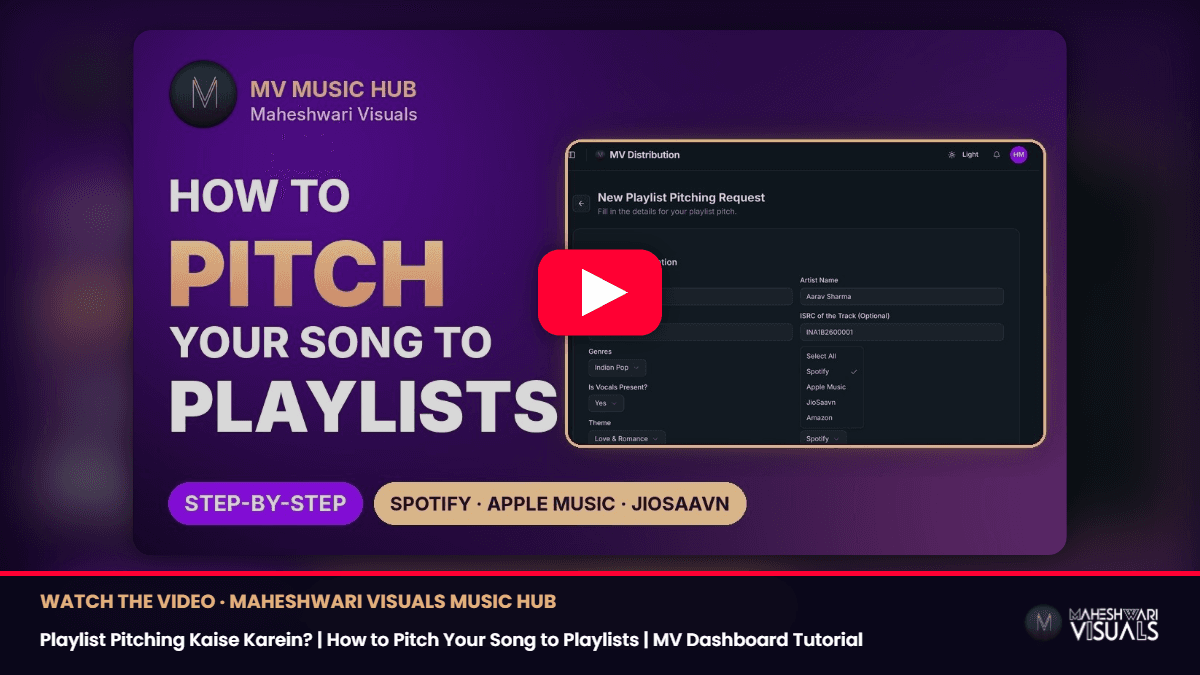
▶ Watch on YouTube: Playlist Pitching Kaise Karein? | How to Pitch Your Song to Playlists | MV Dashboard Tutorial
Why Songs Land on the Wrong Amazon Music Profile (and How to Fix It)
Wrong profiles are the most common Amazon Music headache for Indian artists, especially when several singers share a common name.
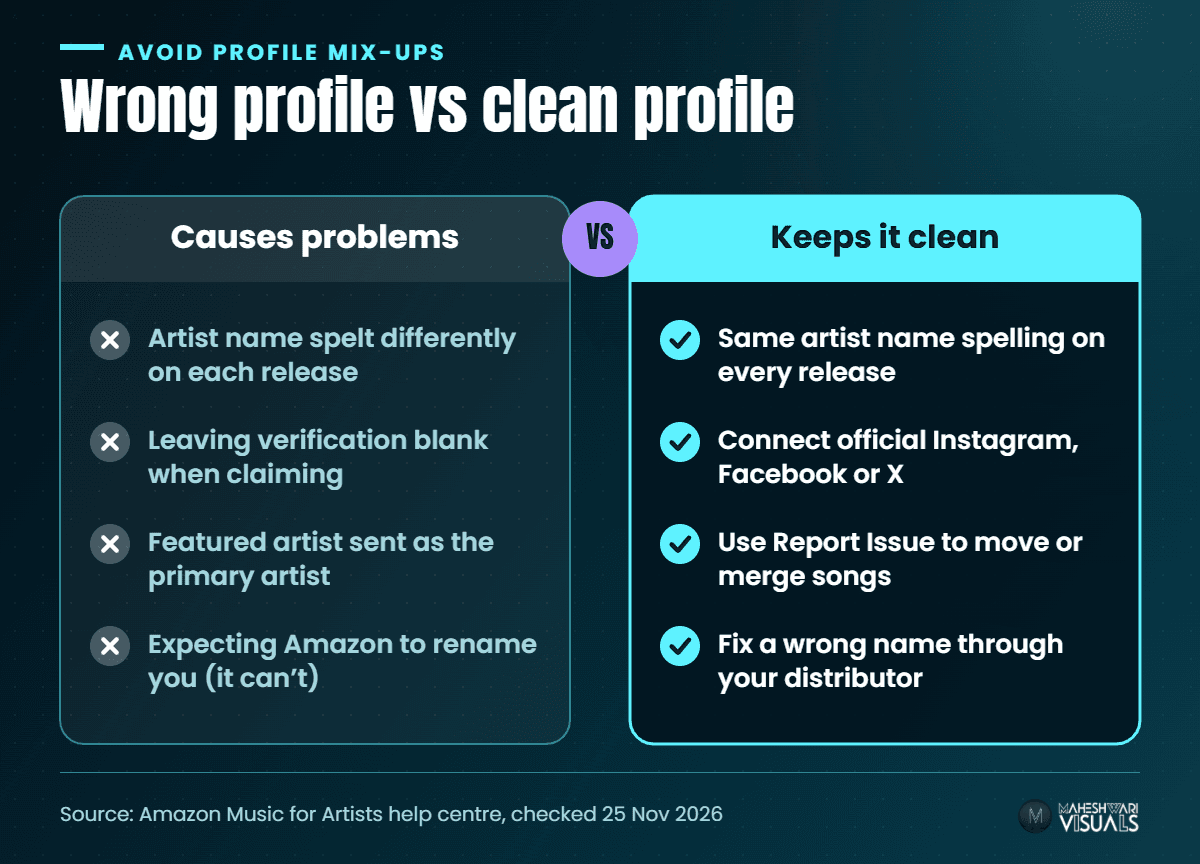
Amazon gives you a Report Issue tool in Amazon Music for Artists. You can use it even if you haven't claimed your profile. It can move your songs to the right profile, remove someone else's songs from yours, or merge two profiles that belong to the same artist, with up to 50 albums or songs per request.
The tool can't change your artist name, though. If the music is correct but the name is wrong, the name was delivered incorrectly, so your distributor has to fix the metadata and redeliver.
Growing on Amazon Music and Alexa
Amazon Music also reaches listeners through voice. Amazon retired its Spotlight voice messages for artists in July 2024, but voice reporting and the Daily Voice Index are still available in Amazon Music for Artists. That gives you a way to see how people ask for your music by voice.
A few habits help your song get found on Amazon Music:
- Keep song titles simple and easy to say. Avoid extra symbols in the main title. Put versions such as "Lofi" or "Remix" in the version field.
- Share one smart link for every release so fans on Amazon Music, JioSaavn and Spotify all land in the right place.
If you're also releasing to other platforms, follow our step-by-step guides to uploading on Spotify, Apple Music and JioSaavn.
How MV Distribution Helps
MV Distribution delivers your music to 100+ stores in one go, including Amazon Music, Spotify, Apple Music, JioSaavn, YouTube Music, Gaana and Instagram. Releases can go live within 24 hours. You keep 100% of your rights, and real humans on our support team reply within 24 hours if something like a wrong profile or a misspelt name needs fixing.
Conclusion
Uploading a song on Amazon Music always goes through a distributor, so the quality of your release data decides how your profile looks. Once you're live, claim Amazon Music for Artists with your social accounts connected, add sharp images and pitch one track from every new release while it is still eligible. If songs land on the wrong profile, use the Report Issue tool, and fix name errors through your distributor.
Your music deserves to reach every listener, from phone screens to smart speakers. Ready to release? Sign up for music distribution with Maheshwari Visuals and get your next song onto Amazon Music and 100+ other stores.
FAQs
Can I upload my song directly to Amazon Music?
No. Amazon Music receives music only from distributors and labels. Release through a distributor like MV Distribution, then claim your profile in Amazon Music for Artists.
Do I need an Amazon account for Amazon Music for Artists?
Yes. You sign in to Amazon Music for Artists with an Amazon shopping account, on the web at artists.amazon.com or in the iOS or Android app. Create one first if you don't have it.
How do I get verified on Amazon Music for Artists?
Claim your profile, then connect your official Instagram, Facebook or X account during the claim, or connect a supported distributor account. If your claim is denied, message Amazon in the app with proof such as your official website.
Why is my song showing on another artist's profile on Amazon Music?
This usually happens when artists share a name or the metadata was wrong. Use the Report Issue tool in Amazon Music for Artists to move your songs. If your name itself is wrong, ask your distributor to redeliver it.
Sources: Amazon Music for Artists help centre (intercom.help/amazon-music-for-artists), articles Getting Access as an Artist or Manager, Pitch Tool, Artist Images, Amazon Music Artist Profiles, Artist Profile Issues, Update artist name and Spotlight, all checked 25 November 2026.
Comments
Related Articles

How to Release a Bhajan on Spotify and JioSaavn: Devotional Music Guide for Indian Artists

How to Upload Your Song on Apple Music from India: Step-by-Step Guide for Independent Artists
